Boomerang - SOAP & REST Client
Introducing Boomerang: A Top
Chrome Extension
for API Testing and Debugging
Boomerang is a highly acclaimed
Chrome extension
that has been rated an impressive 4.57 out of 5 by users. This powerful tool is designed to simplify API testing and debugging, offering a range of useful features and utilities.
Seamless Integration of SOAP and REST Services
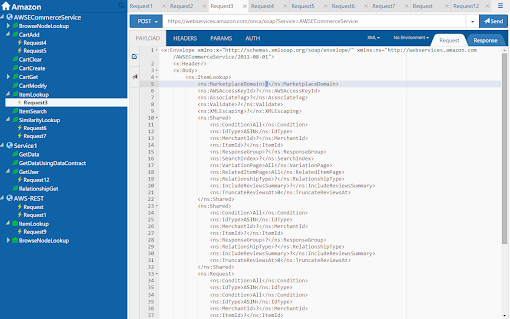
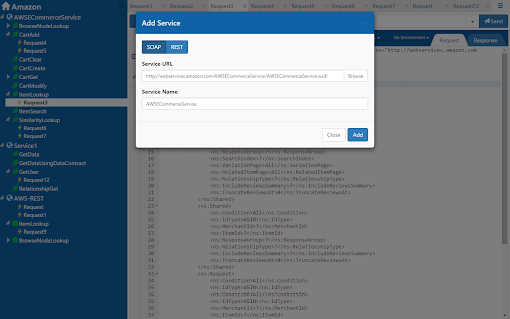
One of the standout features of Boomerang is its seamless integration of SOAP and REST services. Whether you're working with SOAP or REST APIs, Boomerang has got you covered. Unlike other SOAP clients, Boomerang is lightning-fast, saving you valuable time and effort.
Efficient Project and Request Organization
Boomerang makes it easy to organize your API testing and debugging projects. You can group SOAP and REST services into projects and further organize your requests into collections. This level of organization streamlines your workflow and ensures easy access to all your resources.
Easy Configuration Updates with WSDL and Serialized XML
Boomerang offers the ability to update WSDL (Web Services Description Language) and import serialized XML. This is particularly useful for working with complex APIs that require specific configurations. With Boomerang, you can make quick and hassle-free changes to your API setup.
Flexible Environment Variables
Boomerang supports environment variables, allowing you to define variables that can be used across different requests. This feature makes it effortless to switch between different environments without manually updating each request.
Data Import and Export Capabilities
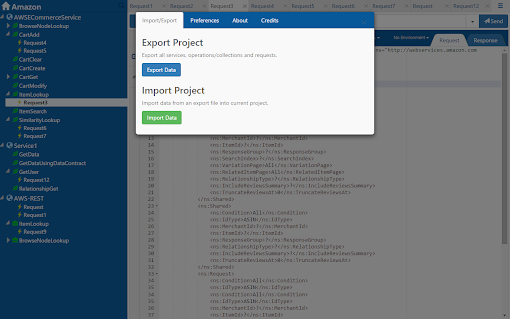
Data import and export capabilities are built into Boomerang, making it easy to save and share your API configurations. This feature is especially beneficial for collaboration with team members or transferring your API setup to a different environment.
Enhanced Security and Query Building
Boomerang offers basic HTTP authentication to ensure secure API requests. Additionally, it provides a query string builder, simplifying the construction of complex queries without manual parameter entry.
Effortless Request History Access
The history of sent requests feature in Boomerang allows you to easily access previously made API requests. This eliminates the need to manually keep track of your requests and saves time when debugging or retesting.
HTML Response Preview for Visual Representation
For developers who prefer a visual representation of their API responses, Boomerang offers an HTML response preview. This feature allows you to quickly inspect the response and ensure everything is working as expected.
Syntax Highlighting for Efficient Debugging
Boomerang incorporates syntax highlighting, making it easy to identify any syntax errors or inconsistencies in your API requests. This feature saves you from potential headaches down the line.
Customization and Filtering Options
Boomerang allows you to set custom request headers, providing flexibility to tailor your API requests to specific requirements. Additionally, the tool offers filtering options, allowing you to search for specific requests or filter based on various criteria.
Additional Features for Enhanced Experience
Boomerang also includes additional features such as TabJump and Duplicate request, further enhancing your API testing and debugging experience.
In conclusion, Boomerang is a highly regarded Chrome extension for API testing and debugging. With its impressive rating and positive user feedback, it is clear that this tool is a game-changer for developers. Its seamless integration of SOAP and REST services, powerful features, and user-friendly interface make it a must-have for anyone working with APIs.
If you're in need of a reliable and efficient Chrome extension for API testing and debugging, look no further than Boomerang. Give it a try and experience the benefits for yourself.




















30 Reviews For This Extension
easy to use very helpful
You guys are so mean
Works really well and it is quite light.
Very useful, and easy to play
Love it.
BoomerangAPI is quite a powerful and convenient testing tool. It has such features as organizing requests in a tree with folders, Environments with variables, and the ability to export/import my work to a file. The Help desk (Feedback button) deserves a special mention. When I described my issues, I received a very quick answer (within a few hours) that helped me get back on track. Overall, it's my favorite testing tool.
Ringan dan cepat, Request body that is more than 11 lines is hidden, maybe need scroll element.
Ever since the new version has been installed, I keep losing my projects from the project list. As soon as I close and open a new tab for boomerang, boom!! all the old projects gone. I don't seem to find a way to save them permanently. If I add a new project in addition to the existing ones, all of them appears with the new name, all three with the same name and even the contents. I try to refresh, one come back but the other two still a copy of each other. In the older version, I was even able to close the browser and was able to open the extension with my pervious work still there after months.
pre version is better
Like the very first step, uploading a json collection from Postman : Cannot read properties of undefined (reading 'raw') seriously ....
Had used Wizdlr for years (no longer supported by Chrome). Have not yet found all the features Wizdlr had, but Boomerang has proven intuitive to use so far.
Bit disappointing. Was using Wizdler which is now being switched off by Chrome. Wizdler was able to take a WSDL file and not only find all available functions but also list all the parameters and their data types in a readymade SOAP envelope. With Boomerang, all I get is a completely empty SOAP envelope as a starting point for the request, so I've got to somehow work out the parameters and data types myself.
Cool extension. A few questions. Is it possible to access environment variable from pre-request and post-request script? Is it possible to assign values to environment variables in pre-request and post-request script? Is it possible to set headers, params, etc. in pre-request script? I didn't find a guide
Simple yet very useful.
After updating to version 8.18.0, the extension stopped launching and cannot load earlier projects UPD Error text in the console: "Uncaught (in promise) g {name: 'DatabaseClosedError', message: "DataError Failed to execute 'add' on 'IDBObjectSto…he object store's key path did not yield a value.", inner: g}" inner:DataError: Failed to execute 'add' on 'IDBObjectStore': Evaluating the object store's key path did not yield a value. at chrome-extension://eipdnjedkpcnlmmdfdkgfpljanehloah/assets/main-CbpmHgya.js:34:41052 at v (chrome-extension://eipdnjedkpcnlmmdfdkgfpljanehloah/assets/main-CbpmHgya.js:34:2962) at new Le (chrome-extension://eipdnjedkpcnlmmdfdkgfpljanehloah/assets/main-CbpmHgya.js:34:3255) at Object.mutate (chrome-extension://eipdnjedkpcnlmmdfdkgfpljanehloah/assets/main-CbpmHgya.js:34:40252) at Object.mutate (chrome-extension://eipdnjedkpcnlmmdfdkgfpljanehloah/assets/main-CbpmHgya.js:34:64836) at Object.mutate (chrome-extension://eipdnjedkpcnlmmdfdkgfpljanehloah/assets/main-CbpmHgya.js:34:72712) at Object.mutate (chrome-extension://eipdnjedkpcnlmmdfdkgfpljanehloah/assets/main-CbpmHgya.js:34:66735) at Object.mutate (chrome-extension://eipdnjedkpcnlmmdfdkgfpljanehloah/assets/main-CbpmHgya.js:34:62941) at chrome-extension://eipdnjedkpcnlmmdfdkgfpljanehloah/assets/main-CbpmHgya.js:34:28523 at chrome-extension://eipdnjedkpcnlmmdfdkgfpljanehloah/assets/main-CbpmHgya.js:34:9465 message: "Failed to execute 'add' on 'IDBObjectStore': Evaluating the object store's key path did not yield a value.\n DataError: Failed to execute 'add' on 'IDBObjectStore': Evaluating the object store's key path did not yield a value." name: "DatabaseClosedError"
It doesn't work after the update. Writes an network error. Please verify the URL and ensure it is accessible
simple yet very useful
Been using it for years; Excellent Tool. Just works.
not able to see header data after last update all header values are contain the name of the header key instead of real value
Been using it for years. Particularly useful if you need to work with SOAP webservices.
Excellent Tool to test SuccessFactors API's. Excellent.......
Love it - versatile and full of options.
Excellent tool. Use it daily. Strongly recommended.
Easy to use, effective and incredibly helpful for planning the structure of API requests.
It is very intuitive and appealing.
Easiest and best tool for SOAP calls. If you have to make them, this is the way to go.
Excellent tool
This is the best restful client, period!
Really simple and useful
Sommetimes a bit slow but very fiendly tool